
長年にわたり、デジタルアート用ハードウェアの世界において「プロフェッショナル」という言葉は、サイズと密接に関連付けられてきました。
より広い作業エリア。
より多くのボタン。
より大きなスクリーン。
より多くの機能。
その理由は容易に理解できます。描画範囲が広ければアーティストはストロークを大きく動かす余裕が生まれ、追加のコントロールや高性能なコンポーネントは、要求の厳しいプロのワークフローにおいて価値を発揮するからです。
しかし、サイズや機能の数は、パフォーマンスと同意ではありません。
多くのクリエイター、特にノートPCで作業をする人や、場所を移動する人、あるいはすでに大型の外付けモニターを備えている人にとって、コンパクトなペンタブレットの方が理にかなっている場合があります。真の問題は、デスクにどれだけのハードウェアが収まるかではなく、そのハードウェアのうち、アーティストの作業方法に実際に貢献しているのがどれだけあるかということです。
ここで興味深い疑問が浮かびます:
小型のペンタブレットは、アーティストが通常より大型のプロ仕様デバイスに期待する核心的なパフォーマンスを実現できるのでしょうか?
答えはイエスです。ただし、製品が適切な優先順位に基づいて設計されていることが条件です。
それこそが、「小型フラッグシップ」と呼べる製品の背後にある考え方です。すべてのプレミアム機能を詰め込むのではなく、アーティストが最も重視する部分、すなわちペンレスポンス、精度、筆圧感知、反応速度、携帯性、そして日常的な使いやすさに重点を置いたコンパクトなデバイスです。
DIGIDRAW T410は、このアプローチの有用な一例と言えます。
「プロ」=「大型」である必要はない
物理的なサイズを性能と関連付ける傾向は自然なものです。
大型のタブレットの方が実質的に優れているように見えます。製品が大きければ、使う前からプロフェッショナルな感覚を得られることがあります。
しかし、デジタル描画ハードウェアには、根本的に異なる2つの目的があります。
第一は、クリエイティブな入力のための表面を提供すること。
第二は、その入力の周囲にあるディスプレイ、コントロール、そして物理的なワークスペースを提供すること。
画面のないペンタブレットの場合、ディスプレイはすでに別の場所にあります。
アーティストは24インチのモニターやノートPC、あるいはマルチモニター環境で作業しているかもしれません。そのような状況では、入力デバイスを物理的に大きくしたからといって、出力の質が向上するわけではありません。
重要な問いはこうなります:
タブレットは、ペンの動きをどれほど効果的にコンピュータへ伝達できるか?
その時、筆圧感知やペン解像度、レポートレート、精度といった仕様は、デバイスそのものの物理的な寸法よりもはるかに重要になります。
T410が示す「フラッグシップ」への異なるアプローチ
 DIGIDRAW T410は、6.3 × 3.9インチの読み取り範囲と約219gの重量を持つ、コンパクトな画面なしペンタブレットです。
この数値だけで、どのようなデバイスであるかが一目瞭然です。
デスクを占拠するための設計ではありません。
配置しやすく、持ち運びやすく、より広範な制作環境に統合しやすいように設計されています。
しかし興味深いのは、DIGIDRAWがこのコンパクトな筐体に何を詰め込んだかということです。
T410は以下を提供します:
- 16,384レベルの筆圧感知
- 5080 LPIのペン解像度
- 330 PPS以上の有線レポートレート
- ±0.3 mmの精度
- USB-C接続
- M3 / Magic Pen 3.0 バッテリーレススタイラス
言い換えれば、T410はコンパクトなサイズを売り物にするために、核心的な入力性能を犠牲にしてはいないのです。
むしろ、手とペン、そしてソフトウェアとの相互作用に直接影響する部分に集中しています。
それこそが、「小型フラッグシップ」という考え方を興味深いものにしています。
ペンタブレットを「プロ仕様」と感じさせるものは何か?
 プロフェッショナルな描画体験を、一つの数値だけで語ることは困難です。
筆圧感知は重要です。
精度も同様です。
反応速度もそうです。
そして毎日何時間もタブレットを使用するようになれば、携帯性や身体的な快適さも重要になってきます。
T410の仕様は、このバランスを物語っています。
16,384レベルの筆圧感知
筆圧感知は、タブレットがペンにかかる力の変化をどれだけ細かく識別できるかを決定します。
イラストレーターにとって、これは線の太さ、ブラシの不透明度、そして繊細なストロークの表現などに影響します。
数値だけがすべてではありません。筆圧の調整機能やソフトウェアとの連携も、その筆圧レベルがいかに自然に感じられるかに影響します。
しかし、高い筆圧感知能力は、システムが圧力の微妙な変化を捉えるための余裕を大きくしてくれます。
5080 LPIのペン解像度
LPI(Lines Per Inch)は、タブレットの位置検出解像度に関連する数値です。
これは特に正確な動き、細い線の描画、詳細なデジタルドローイングにおいて重要です。
線画、レタリング、あるいは緻密なディテールに時間をかけるアーティストにとって、小さな手の動きを正確に反映できることは、タブレットの物理サイズよりもはるかに重要です。
330 PPS以上のレポートレート
T410の有線レポートレートは330 PPS以上とされています。
レポートレートは、タブレットがペンの位置をコンピュータに報告する頻度を表します。
報告頻度が高ければ高いほど入力の反応速度は向上しますが、これは描画時のトータルレイテンシ(遅延)とは混同すべきではありません。完全な体験は、処理速度やドライバ、ソフトウェア、そしてディスプレイのパイプラインにも依存します。
それでも、速いストロークを描くアーティストや、キャンバス上を素早く作業するアーティストにとって、入力の反応の良さは即座に実感できる特徴の一つです。
±0.3 mmの精度
精度は、検出されたペンの位置が意図したカーソルの位置とどれだけ一致しているかを表します。
これは、アーティストが意図した正確な場所に線を描く必要がある場合に特に重要です。
繊細な線画、技術的な描画、レタリング、詳細なイラストなど、すべてにおいて信頼性の高い位置精度が恩恵をもたらします。
これらを総合すると、この製品の明確な哲学が浮かび上がってきます:
T410はサイズこそコンパクトですが、描画の核心的な機能において「入門機」にとどまるつもりはありません。
なぜ小型タブレットを選ぶのか?
 その答えは、描画品質とは無関係であることも多いです。
それは、デスク環境に起因します。
すでに大型モニターを所有しているアーティストにとって、コンパクトなタブレットは理にかなっています。
また、以下のような環境でも役立ちます:
- ノートPC
- マルチモニター環境
- 小さなデスク
- 共有のワークスペース
- 移動先のワークステーション
自宅のスタジオと移動中のノートPCの両方で作業するアーティストを想像してみてください。
大型のタブレットは物理的な広さを提供するかもしれませんが、バッグの中で場所を取り、デスクの上でもかさばります。
219gのデバイスは、全く異なる選択肢です。
ノートPCの横に置き、USB-Cで接続すれば、作業環境を丸ごと作り直すことなくすぐに描き始められます。
それは必ずしも「妥協」ではありません。
優先順位が異なるだけなのです。
コンパクトなタブレットは、複数デバイスを使うクリエイターにとって実用的
現代のクリエイティブワークは、複数のデバイスや場所に分散して行われることが増えています。
イラストレーターは自宅にデスクトップワークステーションを持ち、移動用にノートPCを持っているかもしれません。
学生は授業と自宅を行き来します。
フリーランスは、ある日はクライアントのオフィスで、翌日はスタジオで働くかもしれません。
こうしたあらゆる状況において、携帯性は実用的な価値を持ちます。
T410は、仕様上Windows 7以降、macOS 10.12以降、ChromeOS 88以降、Android 6.0以降、HarmonyOS 2.0以降、そしてUbuntu 20.04 Linuxをサポートしています。
この幅広いOS対応により、特定のコンピュータ環境に縛られたものではなく、柔軟な入力デバイスとして考えることが容易になります。
すべてのOSですべてのアプリケーションが同一の機能を提供できる、と主張するわけではありません。
むしろ、クリエイターが異なる環境間を移動する際、その互換性こそがデバイスの有用性の一部となっているのです。
バッテリーレスペンがもたらすもの
 T410は、M3 / Magic Pen 3.0 バッテリーレススタイラスを採用しています。
つまり、ペン自体にバッテリーや充電の手間が必要ありません。
多くのアーティストにとって、これは些細ですが意義のある利便性です。
こう自問自答する必要はありません:
「ペンの充電をしたかな?」
ただ手に取って描き始めるだけです。
ポータブルな描画デバイスにとって、このシンプルさは特に有用です。
充電に依存するコンポーネントが少なければ少ないほど、コンパクトな制作環境を場所から場所へ移動させることは簡単になります。
繰り返しますが、これは華やかな機能を搭載することではなく、摩擦を減らすことについて語っています。
ボタンが多いからといって、優れたペンタブレットとは限らない
T410には、専用のショートカットキーは搭載されていません。
一見すると、それは欠点のように見えるかもしれません。
しかし、それはタブレットをどのように使うか次第です。
物理的なショートカットを多用するアーティストもいれば、デスクをすっきりさせ、キーボードを近くに置くことを好む人もいます。
デザイナーはすでにキーボードショートカットを深く記憶しているかもしれません。
ノートPCユーザーは、コントロールを増やすよりも周辺機器を減らすことを望むかもしれません。
これは、製品設計における重要なポイントを示唆しています:
フラッグシップ製品は、すべての仕様を最大化する必要はない。
機能を削ぎ落とすことで、より焦点の定まった製品が生まれることもあるのです。
なぜ「小型フラッグシップ」の考え方が初心者に適しているのか
コンパクトなデバイスは、プロフェッショナルだけに役立つものではありません。
初心者にとっても魅力的です。
デジタル描画を学ぶ人は、広い表面と狭い表面、ショートカットキーと専用のコントロールシステムのどれを好むか、まだ分からないかもしれません。
コンパクトなタブレットなら、大きな作業スペースを確保しなくても、直感的に始められるエントリーポイントを提供できます。
またT410は、物理的に大きな環境を強いることなく、高水準なペン入力パフォーマンスを初心者に提供します。
初心者の全員が16,384レベルの筆圧や5080 LPIを必要とするわけではありません。
単に、初心者が始めたばかりという理由だけで、スペックを削ぎ落としたデバイスを買う必要はないということを意味します。
T410の恩恵を最大限に受けられるのは誰か?
コンパクトなフォーマットは、いくつかのタイプのクリエイターにとって特に理にかなっています。
学生
軽量であるため移動が容易であり、USB-C接続はノートPCベースの環境を簡素化します。
初心者
 コンパクトなデバイスは、大きなワークスペースを必要とせずに、確かな描画性能を提供します。
趣味で描くアーティスト
たまにデジタルアートを楽しむ場合、より小さなデバイスはデスクを占拠することなく、必要なものを提供してくれます。
移動の多いクリエイター
 携帯性が、後付けではなくクリエイティブなワークフローの一部になります。
ノートPCユーザー
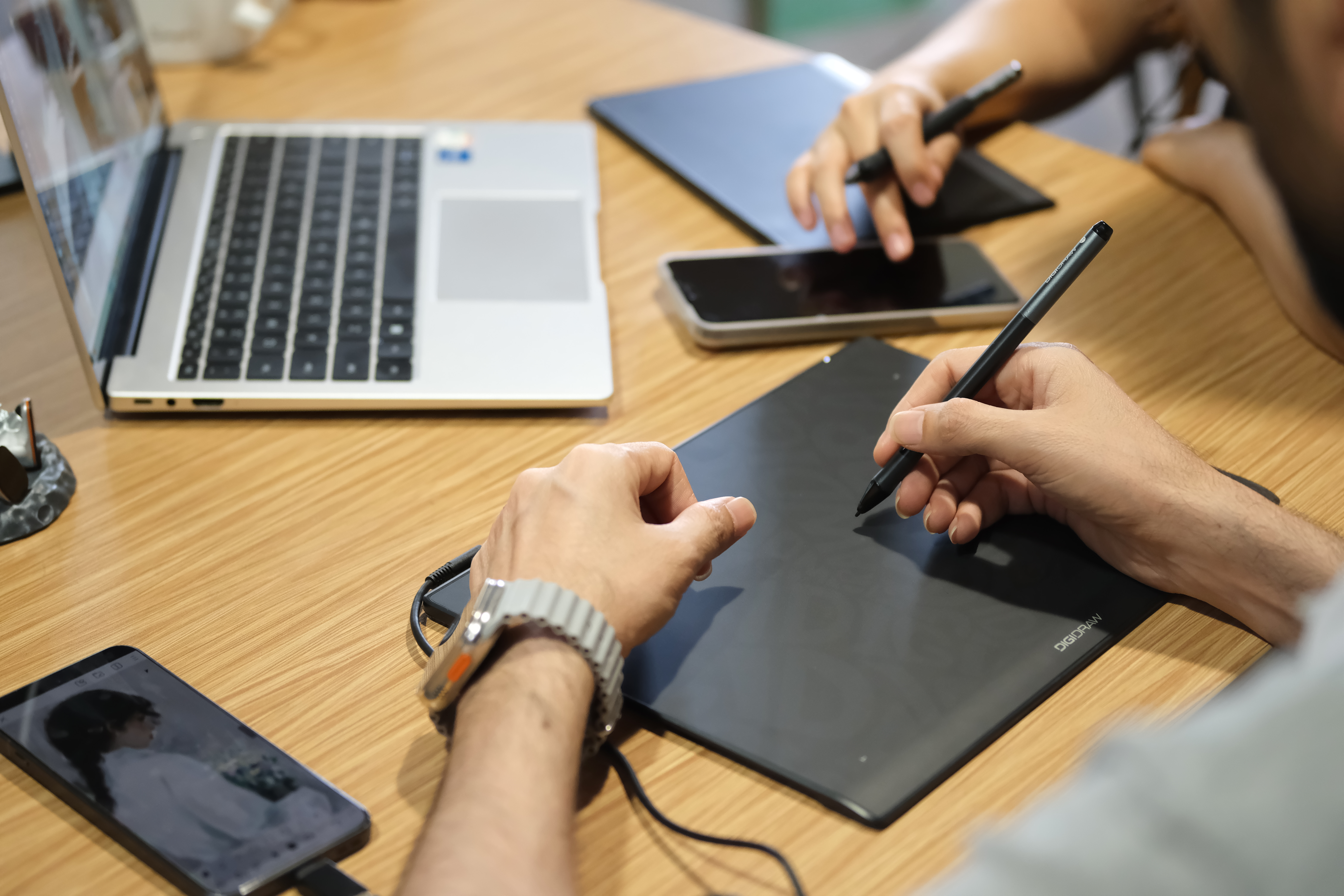 T410は、大型のデスクトップタブレットのスペースを必要とせず、ノートPCの入力デバイスとして機能します。
デザイナーやイラストレーター
 すでに大型モニターを持っているクリエイターは、ディスプレイを追加購入するのではなく、ペン入力に予算を集中させることができます。
複数デバイスの利用者
対応OSの幅広さにより、T410は複数のコンピュータ環境を行き来するクリエイターに適しています。
大型タブレットの方が理にかなっている場合
小型フラッグシップのコンセプトには限界があります。
コンパクトなタブレットは、大型モデルと同じ物理的な作業エリアを提供することはできません。
腕を大きく動かして描くことを重視するアーティストは、より広い読み取り範囲を好むかもしれません。
統合されたショートカットコントロールを求めるクリエイターは、専用ボタン付きのモデルを好むかもしれません。
また、ディスプレイ自体がワークフローにとって重要であれば、液晶ペンタブレット(ペンディスプレイ)という選択肢が全く別の解決策になります。
このため、T410はすべてのプロフェッショナル向けペンタブレットの代替品として提示されるべきではありません。
その目的はより具体的です:
コンパクトで軽量な形状で、強力かつ核心的なペン入力性能を提供すること。
重要な教訓:フラッグシップは「最大」を意味しない
フラッグシップという言葉は、しばしば「より多くの」という言葉と関連付けられます。
より大きな画面。
より多くのコントロール。
より多くの処理能力。
より多くの機能。
しかし、その定義はクリエイティブハードウェアに適用する場合、有用性が低くなります。
プロのアーティストは、機能が増えればその分恩恵を受けるというわけではありません。
重要なのは、そのデバイスが意図したワークフローにおいて、不可欠な作業を並外れて高いレベルでこなせるかどうかです。
T410はその考え方の一つの解釈を実証しています。
物理的な専有面積を小さく抑えつつ、以下を強調しています:
筆圧感知
精度
反応速度
携帯性
バッテリーレスのペン操作
幅広いプラットフォーム互換性
これは、これまでのプレミアム製品の哲学とは一線を画しています。
異なる種類のプロ仕様ツール
アーティストがテクノロジーを使う方法について、重要な側面がもう一つあります。
デバイスに慣れ親しむと、その物理的な存在感は消失し始めます。
アーティストはもう考えません:
「16,384レベルの筆圧を持つタブレットを使っている」
ただ描くだけです。
どれだけペンを動かせばいいか知っています。
どれほどの筆圧をかければいいか知っています。
表面の感触を知っています。
ソフトウェアとデバイスがどう連動するか知っています。
ツールは彼らの「筋肉の記憶」の一部になるのです。
その意味で、コンパクトなデバイスは、作業環境を支配しようとしないからこそ、信じられないほどプロフェッショナルになれるのです。
ただ、自分の仕事を果たすだけなのです。
小型のサイズ、真剣なパフォーマンス
DIGIDRAW T410は、デジタルアート用ハードウェアにおいてますます重要性を増している、より広範な考え方の実例です:
小さいことは、エントリーレベルを意味するわけではない。
219gという重量、6.3 × 3.9インチの読み取り範囲を持つT410は、明らかに携帯性とコンパクトなワークスペースに焦点を当てて設計されています。
しかし、その小さな筐体の下には、16,384の筆圧レベル、5080 LPIのペン解像度、330 PPS以上の有線レポートレート、±0.3 mmの精度が隠されています。
その組み合わせは、大型のプロ仕様タブレットよりも万能に優れているわけではありません。
もっと具体的な何かを果たしています。
アーティストが実際に触れるフィーチャーに集中し、必ずしも必要ではない機能は切り捨てることで、コンパクトなデバイスが何を達成できるかを問いかけています。
ノートPCユーザー、学生、移動の多いクリエイター、趣味のアーティスト、そしてすでに専用モニターを持っているプロにとって、これは強力なアプローチとなり得ます。
「小型フラッグシップ」の背後にある考え方は、最終的にシンプルです:
真剣なパフォーマンスを得るために、最も大きなデバイスである必要はない。時に、最も賢い製品とは、デスク上の場所を節約し、描画において本当に重要なことに注意を払うものである。
0件のコメント